Singink Support & Ticketing
The customer support side of the Singink e-commerce platform — ticket intake with validation, threaded replies, file attachments, and an admin dashboard with live analytics.
4+
CRUD operations
12+
Flask routes
6
Database tables
15+
Validation rules
What it does
- 🎫 Ticket CRUD
- 📊 Admin dashboard
- 🔍 Status filtering
- 💬 Reply system
- 📎 File attachments
- 🔒 Session auth
- 📈 Analytics charts
- ❓ FAQ search
Built with
- Python
- Flask
- Jinja2
- SQLAlchemy
- MySQL
- Bootstrap 5
- JavaScript
- HTML5/CSS3
Walkthrough
Scroll to follow the build, screen by screen.
The problem
Support was buried in a contact form
Every question arrived as an unstructured email — no category, no priority, no history. Staff re-asked the same clarifying questions, and users had no way to check whether anyone had picked their issue up. The first job was giving both sides a shared record.
Intake
Validate at the boundary, not after
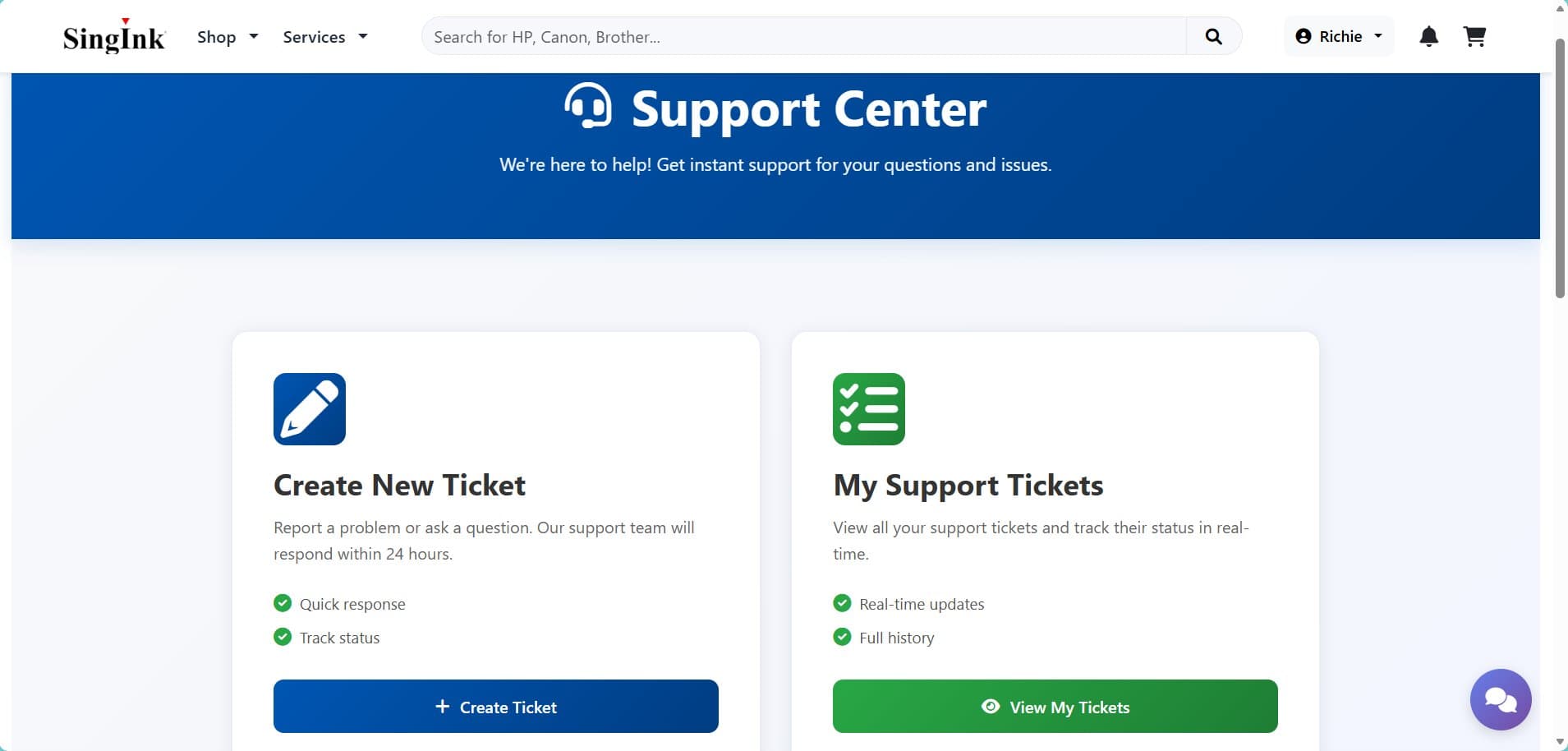
The submission form enforces a real subject line, a category, and a priority before anything reaches the database. Rules live server-side too, because the HTML attributes are a courtesy — anyone can post straight to the endpoint. Rejections re-render the form with the input intact.
Tracking
A ticket the user can actually follow
Once submitted, a ticket has a status the user can see change. That single affordance removed most of the "any update?" follow-ups, because the answer was on screen.
The thread
Replies, attachments, and an audit trail
Each ticket carries a threaded conversation with file attachments and internal notes staff can add without the user seeing them. The timeline is the audit trail — who changed what, and when.
For staff
A dashboard that answers questions at a glance
Open counts by status and priority, resolution times, and the queue itself on one screen. Built so the first thing a staff member sees is what needs attention, not a blank filter form.
The result
The intake form did the heavy lifting
Almost none of the benefit came from the dashboard I was most excited about. It came from the intake form collecting the right information the first time, so tickets arrived actionable instead of needing a round-trip.
01 / 06
The case study
Situation & Task
Singink had high bounce rates and a support load handled entirely by hand. Users could not find assistance efficiently, which produced repeated inquiries and long resolution times. I was tasked with designing and building the ticketing side of the platform to structure issue reporting and response handling.
Actions Taken
Designed and built an OOP-based ticketing module using encapsulation for secure data handling and inheritance for reusable components — ticket submission forms with field validation and error handling, category and priority selection, file upload support, real-time status tracking, an FAQ section with search, and a full admin dashboard with analytics charts, filtering by status and priority, internal notes, and reply functionality. Implemented session-based authentication and role-based access control.
Results Achieved
Structured intake replaced free-text email, so tickets arrived with the category, priority and detail needed to action them without a follow-up question. Status tracking gave users a way to check progress themselves, and the admin dashboard put queue state and resolution times on one screen.
Architecture
- 🌐 Browser (HTML/CSS/JS)
- ⚙️ Flask + Jinja2
- 🛠️ SQLAlchemy ORM
- 🗄️ MySQL Database
MVC architecture with Flask blueprints for modular routing, Jinja2 templates for server-side rendering, and SQLAlchemy for database abstraction. Bootstrap 5 for responsive UI components.
A slice of the code
# Create ticket with server-side validation
@tickets_bp.route('/create', methods=['GET', 'POST'])
def create_ticket():
    if request.method == 'POST':
        subject = request.form.get('subject', '').strip()
        category = request.form.get('category')

        if not subject or len(subject) < 5:
            flash('Subject must be at least 5 characters.', 'error')
            return redirect(url_for('tickets.create_ticket'))

        new_ticket = Ticket(
            subject=subject,
            category=category,
            user_id=session['user_id'],
            status='Open',
        )
        db.session.add(new_ticket)
        db.session.commit()
        return redirect(url_for('tickets.view_ticket', id=new_ticket.id))
Demo
What I took away
- Implementing CRUD operations with proper input validation and error messages that guide users.
- Building role-based access control to separate admin and user functionality.
- Designing relational database schemas with foreign keys for data integrity.
- Creating responsive dashboards with real-time filtering and analytics.
- Handling file uploads securely with Flask and server-side validation.